macOS · 1.0 · magyarul és angolulmacOS · 1.0 · English and Hungarian
Nem „lassú az internet”.
Valamelyik szakasza az.
The internet isn’t slow.
One segment of it is.
A LinkScope folyamatosan méri a kapcsolatodat, és minden romlást a három szakasz egyikéhez rendel: a Wi-Fidhez, a routeredhez vagy a szolgáltatódhoz. Aztán megindokolja, miért. LinkScope measures your connection continuously and attributes every degradation to one of three segments: your Wi-Fi, your router, or your provider. Then it shows its reasoning.
a három szakaszthe three segments
A különbség a válaszThe difference is the answer
Minden mérés három ponton történik külön-külön. A közöttük lévő különbség az, ami megengedi, hogy megnevezzük a hibást — nem az, hogy valamelyik szám nagy. Every measurement is taken at three points separately. The difference between them is what allows the culprit to be named — not the fact that some number is large.
A Wi-FidYour Wi-Fi
A géped és a router közötti rádiós szakasz. Jelerősség, zaj, hozzáférési pont — a rádió fizikája, nem a ping.The radio link between your machine and the router. Signal, noise, access point — the physics of the radio, not the ping.
A routeredYour router
A lakásodon belüli hálózat. És egy fontos megkülönböztetés: sok router lassan válaszol a saját pingjére, miközben a forgalmat hibátlanul továbbítja. Ez nem hiba, és nem is jelentjük annak.The network inside your home. And one important distinction: many routers answer their own pings slowly while forwarding traffic faultlessly. That is not a fault, and it is not reported as one.
A szolgáltatódYour provider
Minden, ami a routereden túl van. Amit ez a szakasz hozzátesz, az kivonással jön ki — és ez az, ami vitatható egy hibabejelentésnél.Everything beyond your router. What this segment adds comes out of a subtraction — and that is what can be argued in a fault report.
az ítéletthe verdict
Nem pontszám. Képesség.Not a score. A capability.
Egy „8,4/10” összehasonlításra hív máshonnan származó, máshogy előállított számokkal. Ehelyett a LinkScope arra válaszol, amit tényleg kérdezel — és minden állítás mellé odaírja, min alapul. An “8.4 out of 10” invites comparison with numbers from elsewhere that were produced differently. Instead, LinkScope answers what you actually ask — and states what each claim rests on.
a dossziéthe dossier
Amit el lehet küldeniSomething you can send
Egy hibabejelentést nem az nyit meg, hogy „néha akadozik”. Hanem 41 konkrét, időbélyeges kimaradás. A LinkScope ebből készít egy PDF-et. A fault report is not opened by “it stutters sometimes”. It is opened by 41 concrete, time-stamped outages. LinkScope turns those into a PDF.
- Kimaradás-táblázatOutage table — minden kiesés kezdete, hossza és szakasza.the start, length and segment of every outage.
- Napszaki profilTime-of-day profile — az esti csúcs, amit egy pillanatnyi sebességmérés sosem mutat meg.the evening peak that a momentary speed test never reveals.
- Vezetékes kontra Wi-FiWired versus Wi-Fi — a lap, ami a „biztos a te Wi-Fid” kifogásra válaszol.the page that answers “it must be your Wi-Fi”.
- HézagokGaps — mikor nem mértünk. Egy feljegyzés annyit ér, amennyire elszámol a saját hézagaival.when nothing was measured. A record is worth only as much as it accounts for its own gaps.
- MódszertanMethodology — hogyan mértünk, és mit nem mértünk.how we measured, and what we did not.
amit nem tudwhat it cannot do
A határai, előreIts limits, up front
Nem hatóságilag ellenőrzött mérés. A legtöbb országban a szolgáltatóval szembeni jogorvoslathoz a szabályozó hatóság által elfogadott eszköz kell. A dosszié ahhoz ad kiindulópontot, hogy tudd, mikor érdemes odáig elmenni — és az utolsó oldala megmondja, hova fordulj. Not an officially recognised measurement. In most countries, formal recourse against a provider requires a tool the regulator accepts. The dossier gives you a starting point for knowing when it is worth going that far — and its last page says where to turn.
A mérés a te gépeden történik, nem a szolgáltató végpontján. A mért értékek ezért tartalmazzák az otthoni hálózat hatását is — ahol el tudjuk különíteni, ott külön jelezzük. The measurement happens on your machine, not at the provider's endpoint. The values therefore include your home network's contribution — where it can be separated, that is stated.
Sávszélességet nem mér folyamatosan. Van beépített sebességteszt, de a folyamatos mérés kis csomagokkal, terhelés nélkül dolgozik: az elérhetőséget, a késleltetést és a csomagvesztést mutatja ki. It does not measure bandwidth continuously. There is a built-in speed test, but the continuous measurement uses small packets and no load: it detects reachability, latency and packet loss.
adatvédelemprivacy
Semmi nem hagyja el a gépedetNothing leaves your machine
Nincs fiók, nincs felhő, nincs telemetria, nincs analitika. A mérések egy helyi adatbázisban vannak a saját gépeden, és nincs olyan pont a kódban, ahol adat elhagyná. Ezt az App Store-ba szánt adatvédelmi manifeszt is így rögzíti — üresen. No account, no cloud, no telemetry, no analytics. Measurements live in a local database on your own machine, and not one measured value ever leaves it — not aggregated, not anonymised. The privacy manifest states exactly that, by being empty.
a felületthe interface
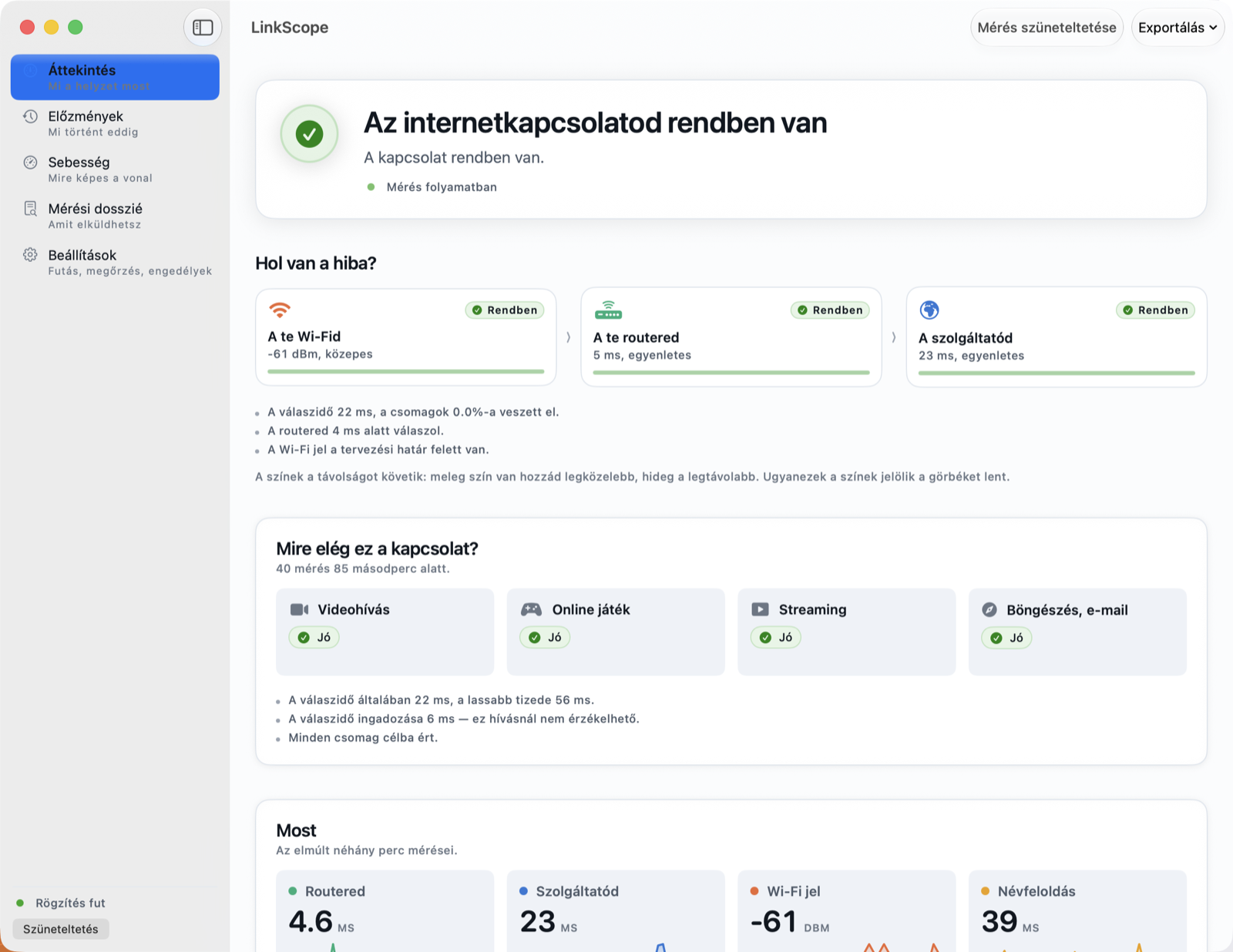
Egy képernyő, ami megindokolja magátA screen that shows its reasoning
Az ítélet, a hibás szakasz, és alatta a bizonyíték — ugyanazon a képernyőn, ugyanabból a mérésből. The verdict, the segment at fault, and the evidence beneath it — on one screen, from one set of measurements.
letöltésdownload
Hagyd futni egy napigLeave it running for a day
Egy perc múlva megjelenik az első ítélet. Egy-két nap múlva lesz mit felmutatni. The first verdict appears after a minute. After a day or two you will have something to show.